

Targeted Virtual
Town Halls
This page walks through every stage of producing a fully managed virtual town hall — from the initial planning conversation through the post-event analytics package. It is designed to give partners and clients a clear, concrete picture of what running one of these events actually looks like, who handles what, and how the technology supports a polished, professional experience for both the principal and the audience.
Every event follows the same nine-step framework. The level of Alpine involvement at each step is flexible and scopes to the client's needs. The platform details described throughout reflect the enterprise-grade webinar infrastructure we use to host every event.
At a glance: Nine steps. One dedicated production partner. A professionally branded experience from the moment a constituent receives the invitation to the moment they leave the event — and a complete data package delivered after the room closes.
to post-event delivery
handling everything
package delivery
Each event moves through nine sequential stages. Steps 1 through 5 happen in the weeks leading up to the event. Step 6 happens in the hour before the event goes live. Steps 7 and 8 happen during the event itself. Step 9 happens within 48 hours after the event concludes.
| # | Stage | Phase |
|---|---|---|
| 1 | Discovery and Event Design | Pre-Event |
| 2 | Branded Registration Page Build | Pre-Event |
| 3 | Invitation Drafting | Pre-Event |
| 4 | Invitation Deployment | Pre-Event |
| 5 | Constituent Registration | Pre-Event |
| 6 | Principal Arrival and Final Walkthrough | Event Day |
| 7 | Going Live and Audience Q&A Submission | Event Day |
| 8 | Moderated Q&A and Discussion | Event Day |
| 9 | Recording, Analytics, and Follow-Up | Post-Event |
Discovery and Event Design
Every successful event starts with a tight planning conversation. Alpine works directly with the client to lock in the event fundamentals before any production work begins. This is the foundation that everything else hangs on.
Decisions made during this stage:
- Event date and time, with attention to legislative calendars, news cycles, and other competing priorities.
- The principal who will headline the event — typically the elected official or organizational leader.
- The topic and framing. Targeted events outperform general events. "The Future of Agriculture in Pennsylvania" pulls a more engaged crowd than a generic open forum.
- The target audience. Topic drives audience: an agriculture event goes to farmers and rural households; an education event goes to parents of school-age children. The data the client already has — or that Alpine acquires for the event — determines who receives the invitation.
- The moderator. Either a member of the client's team or an Alpine team member, depending on client preference.
- Format choices: opening remarks length, whether to include polls, whether to feature additional panelists alongside the principal, and how the closing should land.
- Promotional channels — email only, email plus SMS, paid social, or some combination. This determines what gets drafted in Step 3.
Alpine documents all of these decisions in a one-page event brief that gets shared back with the client for sign-off. Once the brief is approved, production begins.
Branded Registration Page Build
Alpine builds a dedicated registration page for the event. This is the public-facing front door — the URL that goes into every invitation, every social post, every text message. It is fully branded to the client and designed to feel like an extension of their official communications, not a third-party tool.
To build the page, the client provides their existing brand collateral: logo files, color codes, font preferences, and any imagery they want featured. Alpine applies these assets directly to the registration page so it matches the client's established identity. Creation of new branding assets — logo design, color palette development, custom photography, or full brand identity work — is not included in the standard event pricing, but is available as a separate add-on.
Elements customized on every registration page:
- Client logo placed prominently in the header.
- Color theme matched to the client's existing brand palette.
- Custom background image — typically a high-quality photo of the principal, the district, or imagery tied to the event topic.
- Featured speaker profile with the principal's headshot. Additional panelists can be added the same way.
- Event title, description, agenda, and date/time displayed in a clean, easy-to-scan layout.
- Custom registration form fields. Beyond name and email, Alpine can add fields to capture county, ZIP code, key issue interests, or any other data point the client wants to collect for future segmentation.
The page renders cleanly on both desktop and mobile, which matters because a meaningful share of registrations come through phones — especially when SMS is part of the invitation mix.
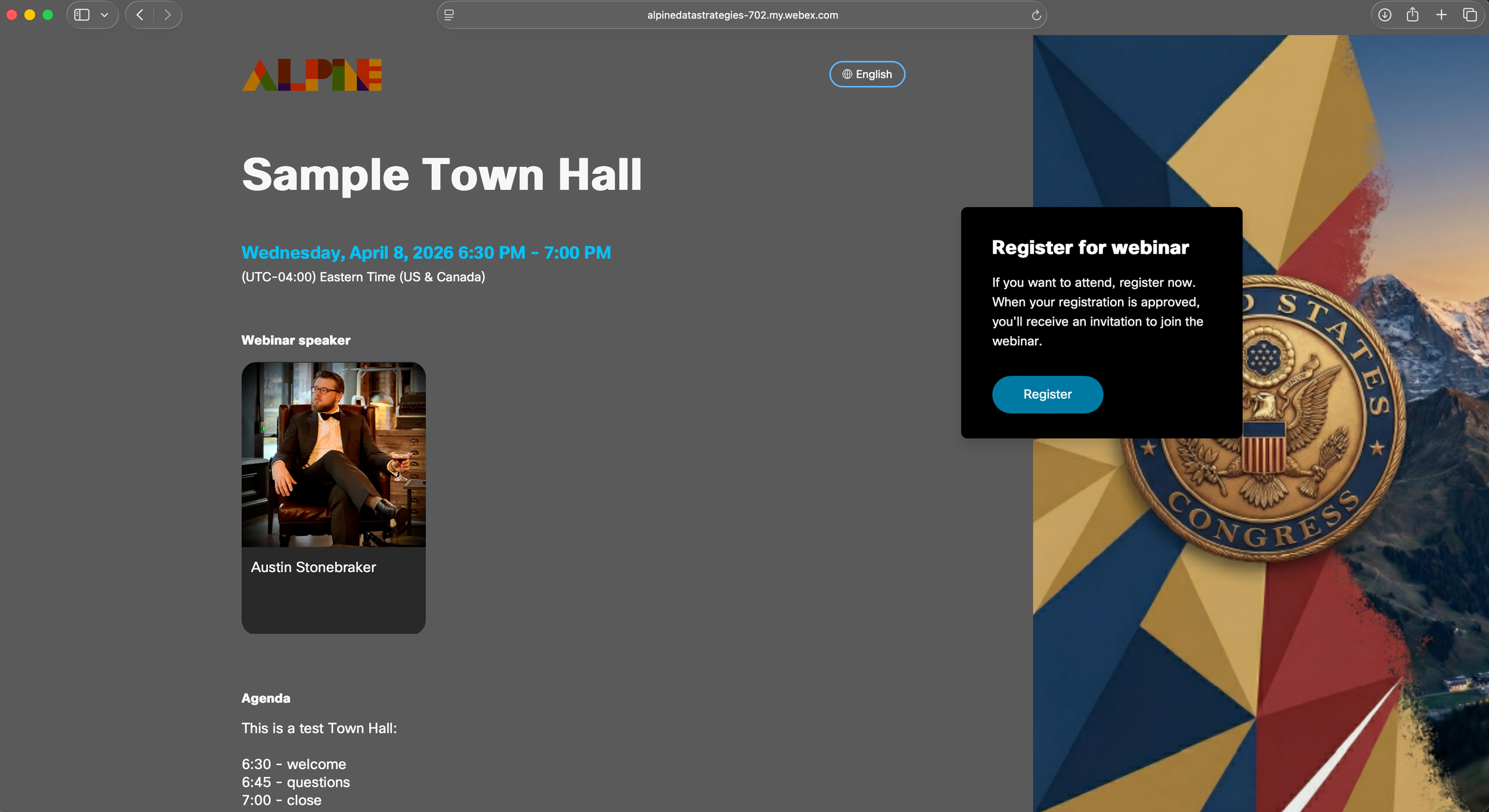

Sample branded registration page and registration form — built and configured by Alpine for each event.
Alongside the public-facing page, Alpine handles the back-end event setup: scheduling the webinar in the platform, configuring the host and panelist roles, locking down attendee chat and Q&A privileges to the configuration the client wants, and generating the unique join links.
Invitation Drafting
Alpine drafts all invitation and reminder copy. This includes whichever channels the client has chosen to use:
- Email invitations to drive the initial registration push (typically a primary send and one or two follow-up sends as the event approaches).
- SMS invitation copy, written tight for the 160-character window and tested for tone.
- Targeted ad copy and creative direction for paid social, if applicable.
- Reminder email copy timed for 24 hours before the event, sent to the list of constituents who have already registered.
All custom copy is sent to the client for review and approval before it goes anywhere. Alpine handles revisions until the client signs off.
Invitation Deployment
There are two paths here, depending on how the contract is scoped:
The client sends the approved invitation copy through their existing email service provider, SMS platform, and ad accounts. Alpine provides the targeting recommendations and the registration page URL; the client's team handles the actual sends. This is the right model for clients who already have a robust outreach infrastructure they want to keep using.
If invitation deployment is included in the contract, Alpine handles everything end-to-end: building the email in the sending platform, applying the targeting filters, queuing the SMS, and pulling the trigger on send day. The client's only job is to approve the copy in Step 3.
In either path, Alpine actively monitors registration volume in the days following each send and recommends adjustments — additional sends, audience expansions, or paid social boosts — if registration is tracking below target.
Constituent Registration
Constituents receive the invitation, click through to the branded registration page, and sign up. The webinar platform captures the registration automatically and immediately fires a confirmation email to the registrant containing their unique join link and a one-click calendar file. This confirmation happens without any intervention from Alpine or the client, and it is what makes the join link delivery work.
Alpine monitors the running registration count in the days following each invitation send and recommends adjustments — additional sends, audience expansions, or paid social boosts — if registration is tracking below the capacity target for the event.
As the event approaches, Alpine pulls the list of registered constituents directly from the webinar platform and uses it as the audience for the reminder sends drafted in Step 3. Reminders typically go out 24 hours before the event. These sends follow the same Path A / Path B split as the original invitations. Either way, this dedicated reminder track is what dramatically improves show-up rates compared to relying on a single invitation send.
Principal Arrival and Final Walkthrough
This step is intentionally designed to feel like joining any other virtual meeting the principal has ever attended. No special software training. No surprise interface.
Approximately 15 to 30 minutes before the event goes live, the principal clicks their unique join link and enters the event room. Alpine and any other featured speakers are already in the room waiting. The audience cannot see or hear anything happening in the room until Alpine takes the event live.
During this window, the Alpine team confirms the principal's audio and video are working, walks them through what to expect once the event begins, and reviews the run-of-show. When the principal is comfortable and the production team is ready, Alpine takes the event live with a single click.
Going Live and Audience Q&A Submission
The event begins. The principal delivers their opening remarks — typically 5 to 10 minutes covering the topic, recent work, and a setup for the conversation to come. While the principal is talking, attendees are submitting questions through a dedicated question panel that is separate from chat.
All incoming questions are visible only to the Alpine moderation team. Off-topic, inappropriate, or duplicative submissions are filtered out before they ever reach the principal or the broader audience. The moderator selects the questions worth addressing and poses them to the principal during the conversation portion of the event.
Chat is locked down for the same reason. Attendees can message the moderation team if they need to flag a technical issue, but they cannot message each other and they cannot post into a public chat feed visible to the room. This eliminates the common webinar problem of attendee chat sidebars derailing the event.
Moderated Q&A and Discussion
Once the principal finishes opening remarks, the moderator takes over the flow of the event. The moderator is either an Alpine team member or a member of the client's team, decided in Step 1.
The moderator's job is to take the questions filtered through in Step 7, group similar ones together, and pose them to the principal in a sequence that builds a coherent conversation rather than a rapid-fire list. The moderator also manages timing — pacing the discussion, leaving room for closing remarks, and making sure the event hits its planned length.
If the client's team is moderating, an Alpine producer remains in the background throughout the event handling the technical side: monitoring audio, tracking attendance, and being ready to step in if the moderator needs support. The client never has to worry about the platform itself — only about the conversation.
The event closes with the principal's wrap-up remarks. Alpine ends the live broadcast cleanly, and the recording stops automatically.
Recording, Analytics, and Follow-Up
Within 48 hours of the event ending, Alpine delivers a complete post-event package to the client. This package includes:
Full Event Recording
Delivered as a high-quality video file the client can repost on their website, share with media, clip for social, or use in future communications. The recording captures everything the audience saw and heard — the principal's remarks, the questions read aloud, and the discussion — but not anything that happened in the private production setup before the event went live.
Audience Report
A complete CSV of everyone who registered and everyone who actually attended, including name, email, join time, leave time, and total minutes watched for each attendee. The gap between registered and attended is a useful audience-quality signal and a re-marketing opportunity — no-shows can be sent the recording with a personalized note. Alpine also delivers a one-page headline summary of the key numbers — total registrants, total attendees, attendance rate, average watch time, and peak concurrent attendees — written in plain language for easy sharing with leadership.
Audience Engagement Data
If polls were used during the event or a post-event survey was deployed, the responses are delivered as a clean export — polling results broken down by question, survey results in CSV format. These optional feedback mechanisms are layered in based on what makes sense for each event.
Everything is delivered as a packaged deliverable the client can act on immediately. The data feeds back into the next event's planning, the audience list, and the broader communications program.
The Client's Role
One of the central design principles of this offering is that the client's team should not have to learn new software or take on operational burden. Their job is straightforward:
- Participate in the discovery conversation in Step 1.
- Approve the event brief, the registration page design, and the invitation copy.
- Send invitations through your own systems (Path A) — or simply approve Alpine's sends (Path B).
- Have the principal click a link and join the event 15–30 minutes early.
- Show up and have a great conversation with constituents.
What the Client Gets
- A polished, professional event that strengthens the principal's relationship with their audience.
- A branded experience from invitation through event close that reflects the client's identity.
- A complete data asset after every event — recordings, attendance, registration, Q&A, polls, and a headline summary.
Let's Plan Your
First Event
Whether you've run virtual town halls before or you're starting from scratch, we'll walk you through what makes sense for your audience, your principal, and your goals. The first conversation takes 30 minutes.